

Automatic Payment Reminders
Stop wasting time chasing payments. Experi sends professional reminders automatically, so you spend less energy on follow-ups.
Automate chasingProfessional Payment Reminders That Work
Set up your reminder schedule once. Experi sends polite, professional reminders before and after due dates. Your clients get a helpful nudge; you stay consistent without awkward calls.
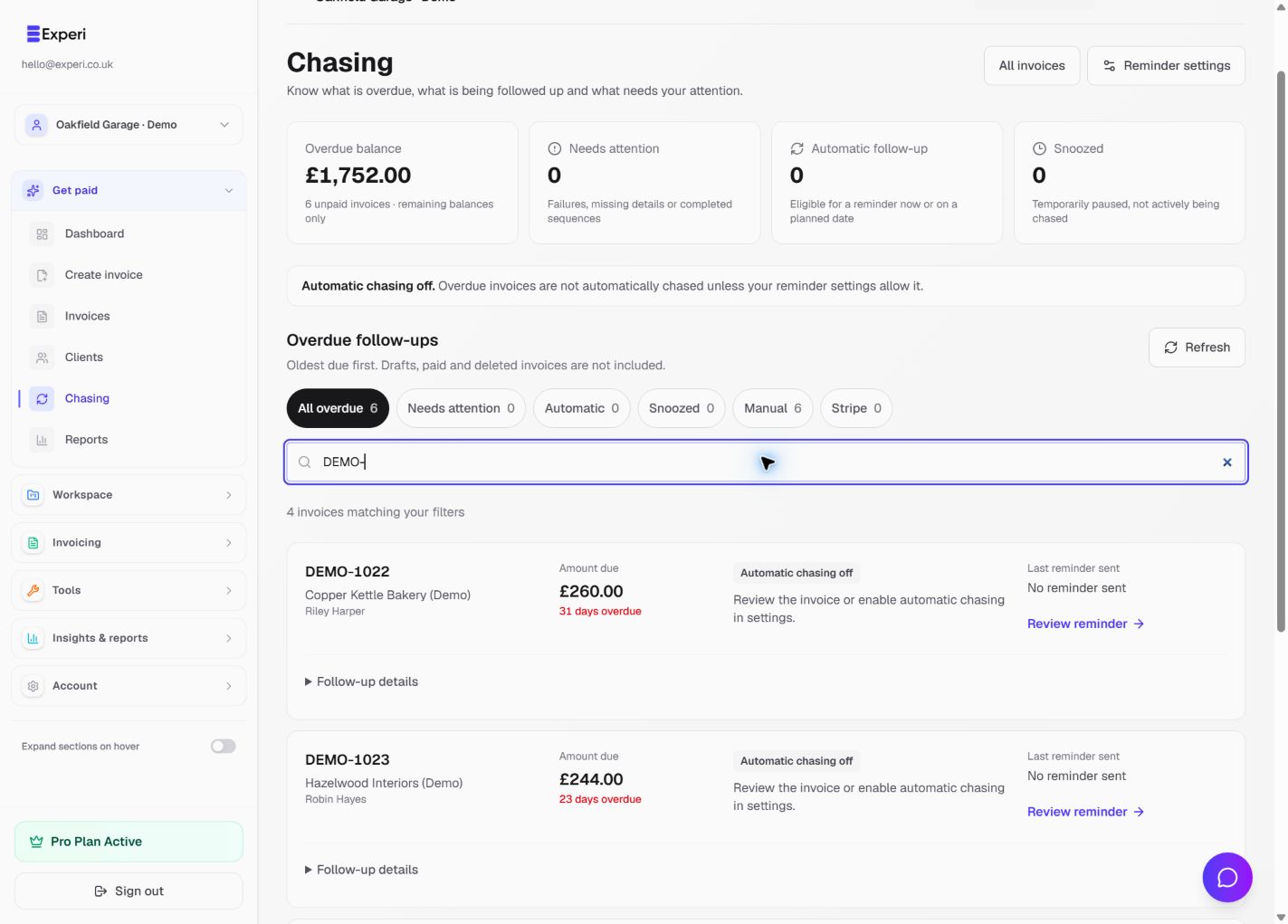
See the workflow in Experi
Use the dedicated Chasing view to distinguish automatic follow-up, paused work and invoices that need attention.
Free manual reminder allowance; Pro automation and recovery tools
Key Benefits
Consistent follow-up
Automatic reminders keep unpaid invoices on your clients' radar - without you writing every chase email yourself.
Never Forget to Follow Up
Busy running your business? Experi never forgets. Reminders go out automatically on schedule, even if you're on holiday.
No Awkward Conversations
Professional email reminders mean you don't have to make uncomfortable phone calls or send awkward 'just checking in' messages.
How It Works
Configure Your Schedule
Set when reminders go out: 3 days before due date, on due date, 7 days after, 14 days after. Customize to your preferences.
Customize Your Messages
Edit reminder templates to sound like you. Professional yet friendly. Include all the details your clients need.
Reminders Send Automatically
Experi tracks all invoices and sends reminders on schedule. You get notified when reminders are sent. Clients get polite nudges.
Perfect For
Pro Plan Feature
Automatic payment reminders are included in the Pro plan. Set up unlimited reminder schedules for all your invoices.
View Pricing DetailsFrequently Asked Questions
When should I send payment reminders?
Best practice is 3 days before due date (friendly heads up), on due date (polite reminder), and 7-14 days after (follow-up). Experi lets you customize your schedule.
Won't reminders annoy my clients?
No. Polite, professional reminders are helpful. Clients are busy too - they often appreciate the reminder. You can customize tone and frequency to match your style.
Can I disable reminders for specific clients?
Yes. Full control per invoice or per client. Disable reminders for clients who always pay on time, keep them for clients who need nudges.
What if an invoice gets paid before the next reminder?
Experi stops sending reminders automatically when an invoice is marked as paid. No embarrassing reminders sent after payment received.
What if reminders don't work and the client still won't pay?
Experi goes beyond basic reminders. For eligible B2B debts, Pro users can calculate statutory interest, create a Letter Before Action starting template, export evidence packs, and follow guided next steps for a court claim or an eligible Small Business Commissioner complaint.
Ready to Try This Feature?
Start using Experi today. All features available to try risk-free.
No credit card required • Start invoicing in under 60 seconds