

What is the invoice reference?
A clear, unique number that helps you and the client identify this invoice.
Straightforward UK invoicing for new businesses
Create professional invoices, keep your clients organised and track what you're owed—with straightforward invoicing that grows with your business.
No card required. Includes a 14-day Pro trial. The Free starter plan includes 5 invoices in total; Pro is £9/month.
You know your work. We'll help you handle the invoicing.
“Creating invoices only takes a couple of minutes.”Irene Piera, freelance user
The Experi First Invoice Starter Kit
Guidance at the point you need it, without a long setup checklist.
Step 1
Use a relevant example, then replace it with your real service and price.
Step 2
Show the issue date, due date and the details your client needs to pay.
Step 3
Creating and saving a draft does not email your client.
Free includes 5 invoices in total
No card and no automatic charge
“Invoices are simple for my clients to understand.”Director, Local Village Care
Experi for iPhone, iPad and Android
The Experi mobile app is available on the App Store and Google Play. Keep your invoices and clients moving when you are away from your desk.


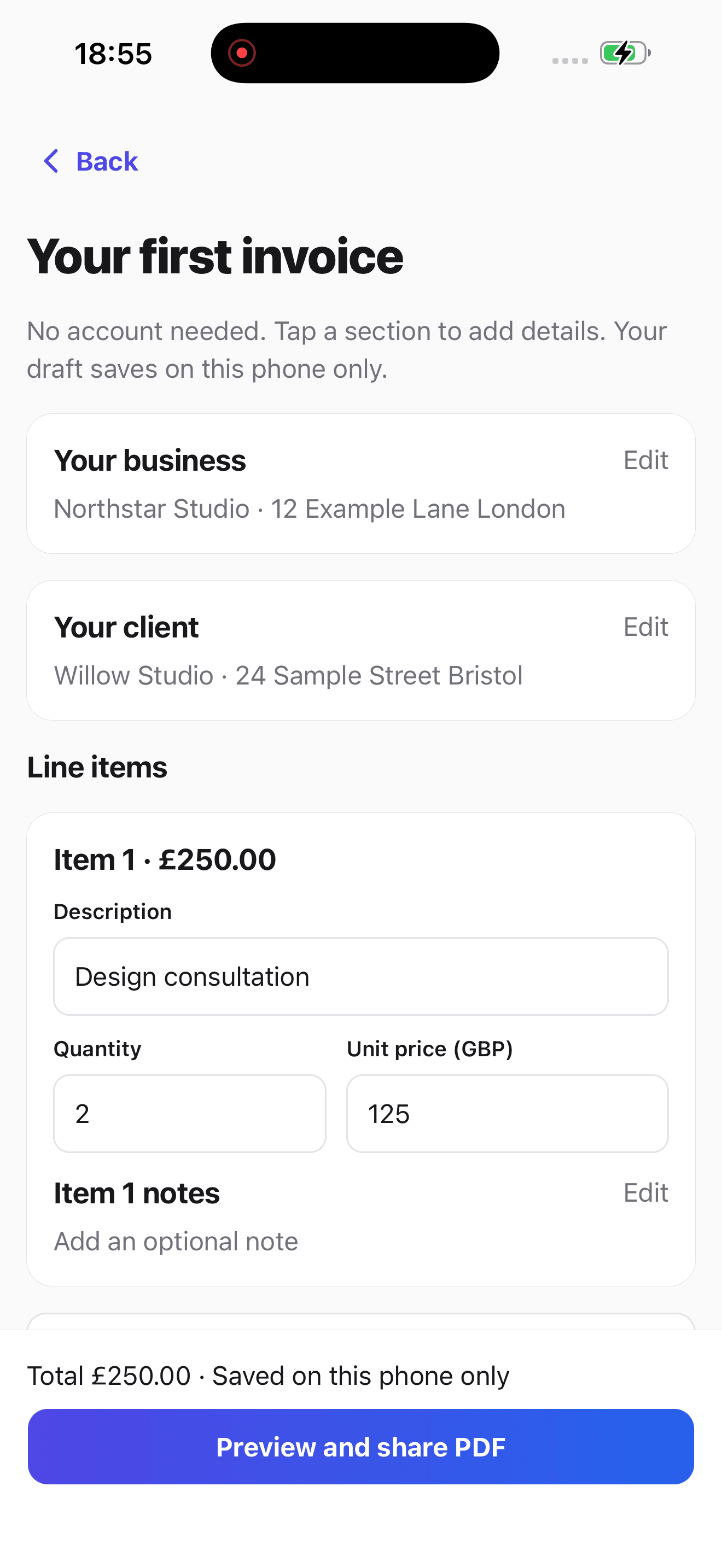
The Experi First Invoice Starter Kit
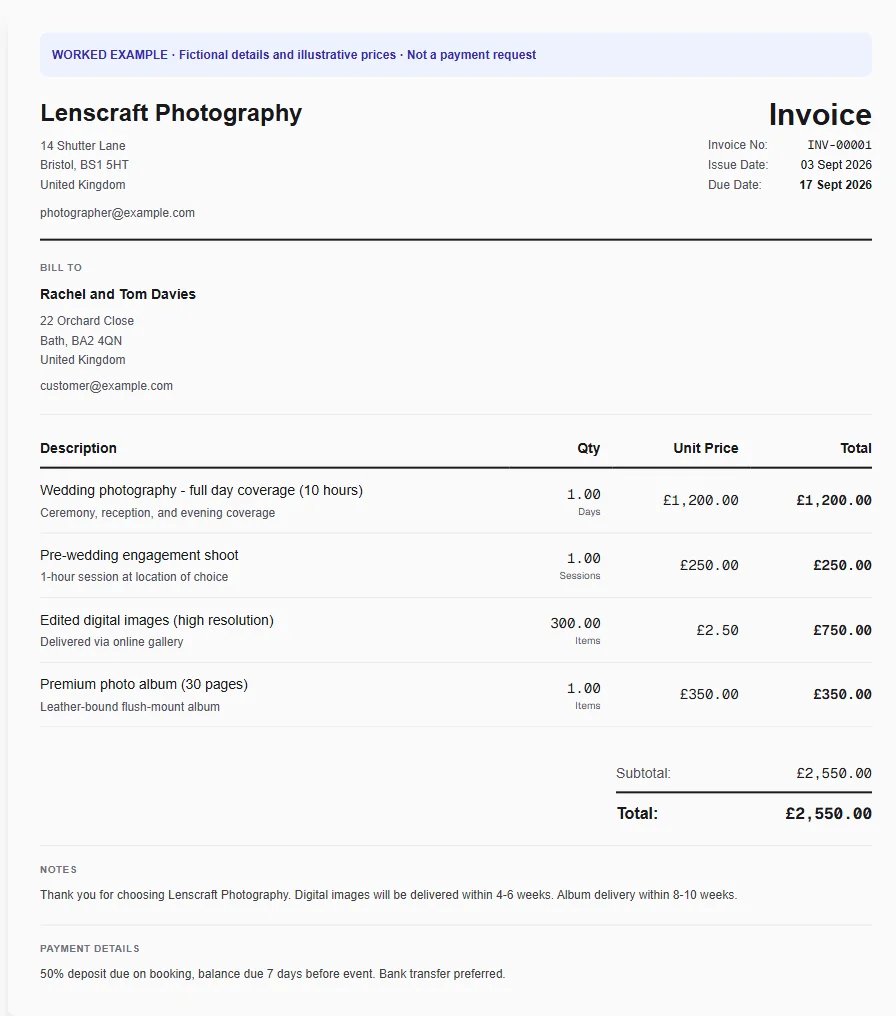
Follow one practical path from a worked example to a checked invoice. The example below is fictional, uses illustrative prices and is not a payment request.
Fictional worked example
The same path works for cleaning, courier, maintenance and other service work.
Start with a fictional invoice for work like yours, then enter your own details and rates.
Save the names and contact details that should appear on the invoice.
Explain what you delivered in plain language and use the price you agreed.
Check the invoice reference, due date, payment terms and how the client should pay.
Save a draft and check the customer copy first. Nothing is sent until you choose a sending action.
A clear, unique number that helps you and the client identify this invoice.
Set a due date that matches the payment terms you agreed for the work.
Experi examples leave you in control. Enter your own rate rather than copying an illustrative price.
Use the correct business and client billing details, then review them before issuing.
What happens next
Experi keeps the invoice useful after it is issued, then removes repeated setup from the next piece of work.
Find the invoice, its status and the date payment is expected without rebuilding your own spreadsheet.
When the money arrives, record it against the invoice and keep the payment history with the work.
Reuse the client and familiar line items instead of typing the same details again for the second job.
Customer stories
Hear how Experi helps freelancers and small businesses keep invoicing clear and moving.
2 customer stories
“Experi has been easy to use, and invoices are simple for my clients to understand. The platform evolves as my needs have. Having automated sending of invoices has been a major time saver.”
Already invoicing?
Reuse clients and familiar services, keep due dates visible and handle payment follow-up without replacing the straightforward invoice flow you started with.
Start with work you recognise
Every example uses fictional details and illustrative prices. Make it your own with the client, work and rate you actually agreed.
See how a shoot, deliverables, due date and payment details can fit on one clear invoice.
View the worked exampleStart with a worked example for completed cleaning visits, then add your own service and rate.
View the worked exampleTurn an agreed delivery into an itemised invoice with the client and payment terms in one place.
View the worked exampleShow labour, materials and job notes clearly, using your own prices for the work completed.
View the worked exampleStart without a card
Explore the complete workflow for 14 days. At the end, choose £9/month Pro or continue with the Free starter plan.
Free starter
5 invoices, 5 quotes, 3 manual reminders and up to 3 clients in total.
Pro · trial included
Unlimited core invoicing and clients, automatic chasing, client payment intelligence, cashflow forecasting and custom branding.
Before you start
Yes. Start with a worked example, add your business and client details, describe the work, set the price and payment terms, then review the customer copy. You remain responsible for checking the final invoice is right for your business.
No. Your 14-day Pro trial starts without a card, and Experi cannot automatically charge you when it ends.
Your records and settings stay in your account. You can actively choose Pro for £9 per month, or continue on the limited Free starter plan. Pro-only automation stops when Pro access ends.
Yes. Free includes 5 invoices and 5 quotes in total, up to 3 clients and 3 manual reminders. These are lifetime allowances rather than monthly resets.
No. You can save and review a draft first. Email sending is a separate action and remains subject to recipient, account and safety checks.
You can still use Experi for repeat clients, reusable services, due-date tracking and payment follow-up. Manual reminder allowances are available on Free; scheduled automatic chasing is Pro-only and remains subject to sending safeguards.
No card. No automatic charge. Your records remain available on Free.