

Not Every Sale Starts with an Invoice
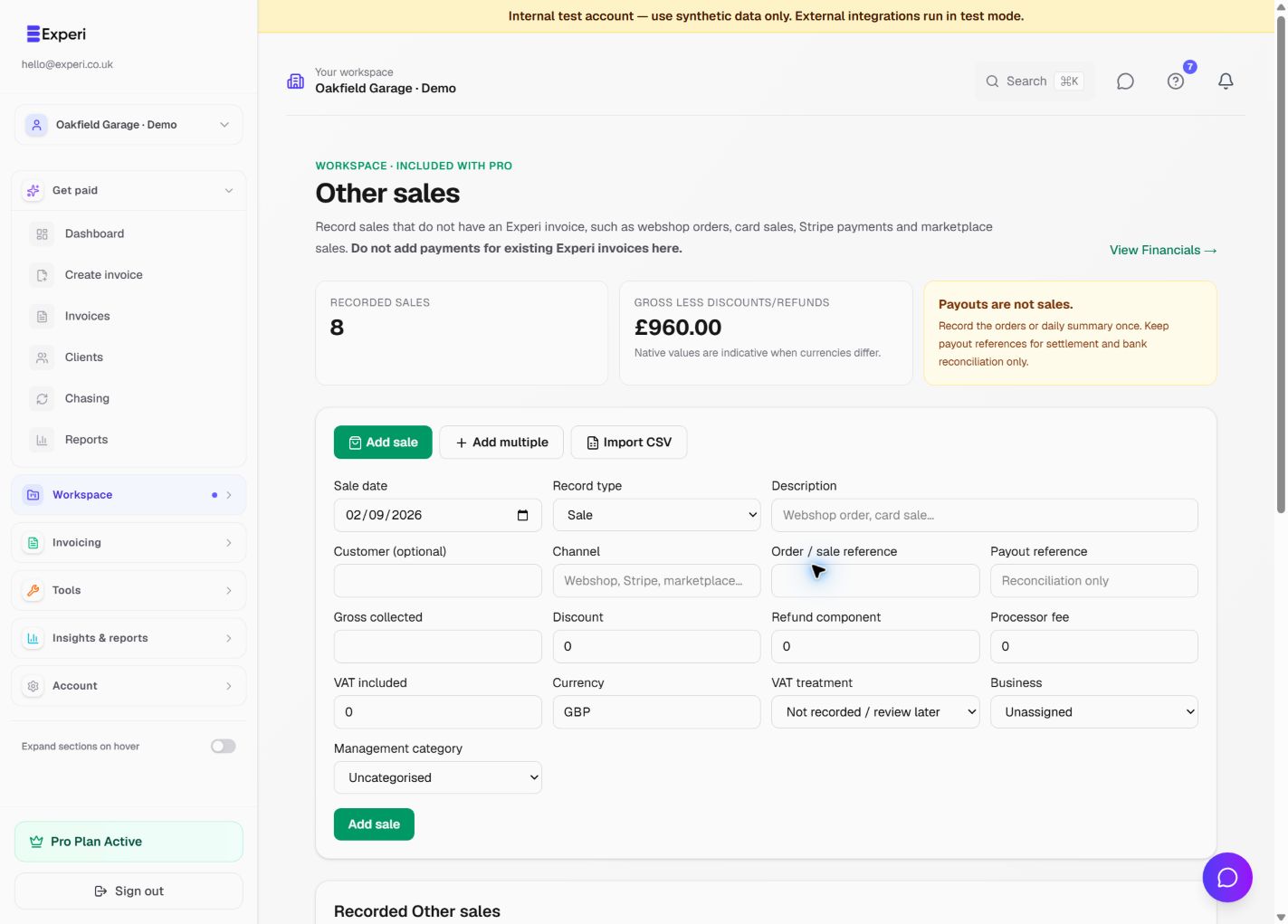
Capture webshop orders, card sales, Stripe transactions and marketplace revenue without creating artificial invoices. Enter one sale, paste a batch, or stage a CSV import before anything reaches reporting.
Record Other SalesA Separate Home for Non-Invoice Revenue
Other Sales keeps ecommerce and high-volume revenue separate from Experi invoices while still feeding Financials and relevant revenue reporting. Clear guidance helps prevent users from entering a payment that is already represented by an Experi invoice.
See the workflow in Experi
Record counter or ecommerce sales, classify business activity and understand management results without double-counting income.
Pro, availability-controlled rollout; may not appear in every workspace
Key Benefits
Built for Real Sales Channels
Record webshop orders, card sales, Stripe payments and marketplace sales with their channel, business, currency and tax information.
Single, Batch or CSV
Add one sale, enter many rows with shared defaults, or upload a CSV. Imports are previewed and validated in staging before you confirm them.
Designed Against Double Counting
External transaction identities make repeat imports idempotent. Experi treats refunds, fees and discounts as sale components and payouts as settlement rather than extra revenue.
How It Works
Choose the Right Recording Method
Use individual orders or daily channel summaries for a source and period. Do not mix both methods for the same sales, and do not add payments for existing Experi invoices.
Enter or Stage the Sales
Add a single transaction, use spreadsheet-style bulk entry with shared defaults, or upload a CSV into the staging area. Invalid rows stay out of reporting.
Confirm and Report
Review warnings and totals, then confirm the batch. Other Sales feeds Financials, dashboard revenue and profit, portfolio and business P&Ls, quarterly and UK tax-year summaries, VAT reports when enough VAT information is recorded, and accountant exports.
Perfect For
Included in Pro
Manual Other Sales, bulk entry and staged CSV importing are included with Financials in the Pro subscription. Direct webshop connections are not required to use the feature.
View Pricing DetailsFrequently Asked Questions
Should I add a payment for an existing Experi invoice here?
No. Existing Experi invoices and their payments already feed reporting. Other Sales is only for revenue without an Experi invoice, such as webshop, card, Stripe or marketplace sales.
Can I import the same file twice?
Repeated imports use workspace, platform account and external transaction identity to remain idempotent. Potential duplicates are detected instead of silently creating more revenue.
Are Stripe payouts counted as sales?
No. A payout is settlement or reconciliation of underlying sales, not new income. Refunds, discounts and processor fees are recorded as components so gross sales are not counted again when money reaches the bank.
Ready to Try This Feature?
Start using Experi today. All features available to try risk-free.
No credit card required • Start invoicing in under 60 seconds