

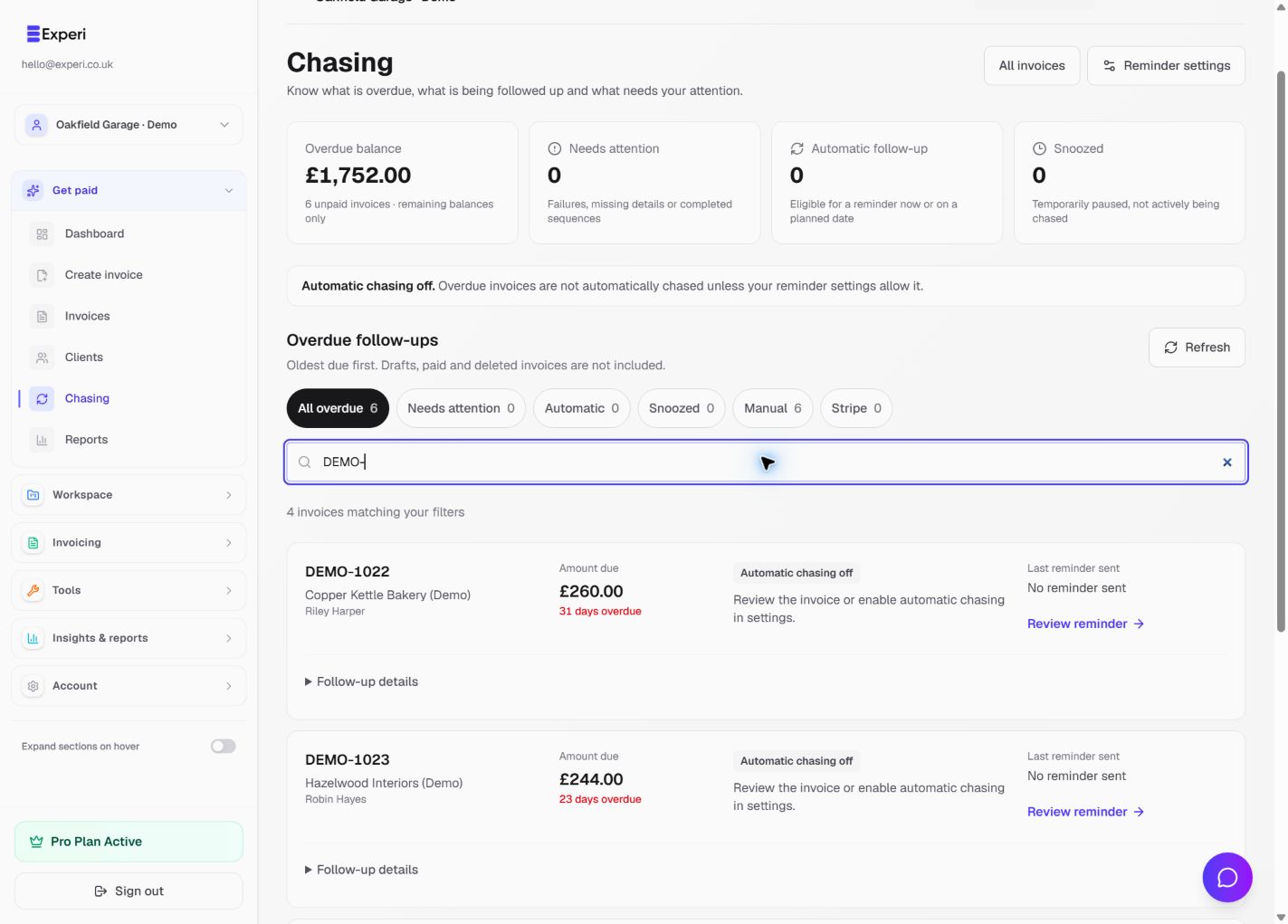
Open Chasing in the sidebar. This is a dedicated view of sent, overdue invoices with a remaining balance in the selected workspace. Draft, paid and deleted invoices are excluded. Opening the view does not send reminders.
Choose what to review
- All overdue shows remaining balances, with different currencies kept separate.
- Needs attention highlights problems such as missing details, failures or a completed sequence.
- Automatic identifies invoices eligible for planned automated follow-up; sending checks still apply.
- Snoozed means follow-up is paused, not actively running.
- Manual requires a manual next step.
- Stripe identifies collection handled through the relevant Stripe workflow.
Search by invoice number, client or company. Expand Follow-up details for the due date, successful chase emails, latest attempt and next step. A planned reminder is not evidence it has been delivered.
Use Review reminder, Review invoice or Review collection when available to open the relevant invoice. Owners, admins and members can perform permitted invoice actions; read-only roles can review the view without sending.
Free includes 3 manual payment reminders total. Automated chasing requires Pro and must be enabled and configured. Choose Reminder settings to review the business's automation. Email sending approval, invoice state and delivery checks still apply; a Pro subscription does not guarantee that every planned reminder can be sent.
Refresh after changing payment or reminder settings. Keep an accurate record of payments and snooze follow-ups where appropriate rather than sending duplicate reminders.