

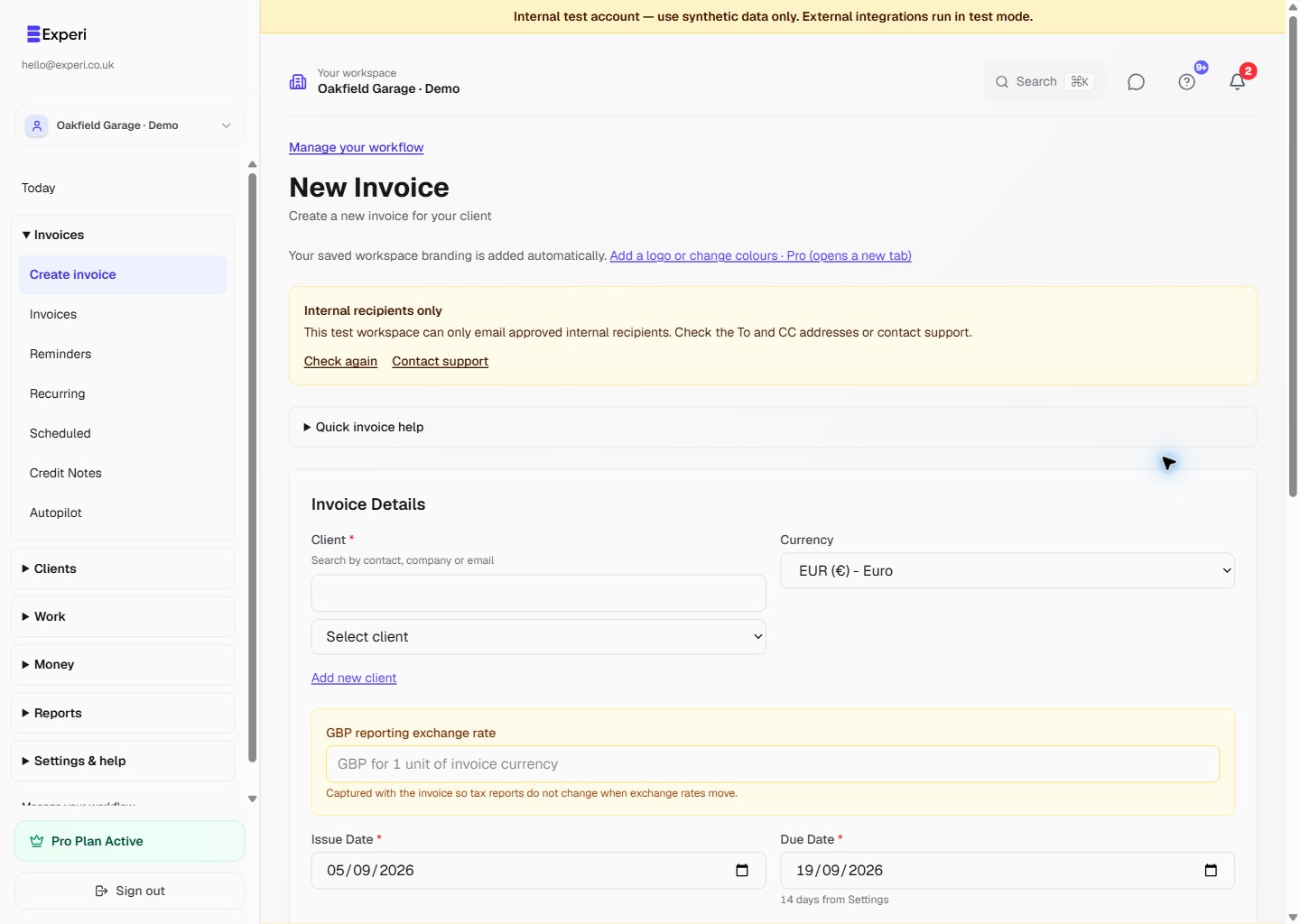
Choose the currency for each customer invoice without changing the default for the rest of your workspace. Free invoicing is GBP-only; non-GBP invoicing requires Pro access.
Follow the screenshot
In this example, EUR is selected, two hours at €100 produce a €200 invoice total, and the GBP reporting-rate field contains an illustrative value of 0.85.
- Check the selected workspace and open Create invoice.
- In Invoice Details, choose the client and select Currency. In this example, choose EUR (€) - Euro.
- For a non-GBP invoice, complete GBP reporting exchange rate. The field expects the GBP value of one unit of the invoice currency, not the inverse rate.
- Enter your descriptions, quantities and prices in the selected invoice currency. Check the currency symbol and total before proceeding.
- Confirm dates, notes and payment details, then choose Create Invoice when the draft is ready to save. Review the saved invoice before using a separate send or issue action.
Understand the reporting rate
The example rate of 0.85 means £0.85 for €1. At that illustrative rate, €200 corresponds to £170 for GBP reporting. It is not a live exchange-rate quote: use an appropriate verified rate for your own records.
The invoice stores the entered reporting rate and GBP subtotal/tax equivalents. It does not fetch a live rate through this field or convert the amount the customer is being invoiced. The customer-facing example remains €200.
Changing the currency does not convert the numbers already entered in your line items. If you switch from GBP to EUR after entering prices, check and re-enter those prices as needed. Do not treat a changed symbol as an exchange-rate calculation.
Supported currencies
The current invoice selector contains 20 currencies:
GBP, USD, EUR, CAD, AUD, NZD, CHF, JPY, CNY, INR, SGD, HKD, SEK, NOK, DKK, PLN, ZAR, MXN, BRL and AED.
Use the code and currency name, not only the symbol: USD, CAD and AUD all use a dollar symbol. The selector being visible does not bypass your plan's currency allowance.
Set the workspace default
Open Settings → Business Profile, choose Currency, then save your changes if you have permission to manage the business profile. New invoices start with this workspace default; you can override it on an individual invoice.
There is currently no saved per-client currency preference. Choosing a different client does not automatically change the invoice currency. Check it each time you invoice an international customer.
Changing the workspace default does not rewrite existing invoices. For a saved draft, use its edit form to review the currency and reporting-rate field before saving any changes.
Before sharing the invoice
Check that your payment instructions make the requested currency clear. A reporting rate is not a bank conversion, a transfer of money or confirmation of payment. Review any connected payment provider's supported currencies and settlement settings separately.
See creating an invoice for the full drafting workflow and printing invoices for physical copies.