

Recurring invoices are a Pro feature for monthly retainers, regular maintenance and other repeat work. An active series creates new invoices on a schedule. Creating an invoice and emailing it are separate choices.
Use the recurring overview to review each billing schedule, then open the settings to check reusable invoice details and automatic sending.
Start from an invoice you have checked
- Select the correct workspace. Create and save an invoice with the client, descriptions, quantities, prices and reusable invoice text you need.
- Open the saved invoice and choose Make Recurring from its invoice actions. This is not a checkbox in the new-invoice form.
- Choose Frequency: Daily, Weekly, Every 2 weeks, Monthly, Quarterly or Yearly.
- Set the Start Date to the first billing period you want generated. Add an End Date if the arrangement has a known finish.
- Leave Automatically send invoices unchecked if you want to review generated drafts before sending. Check it only when the recipient and invoice details are ready for automatic delivery.
- Leave Delete this draft invoice unchecked to keep your original invoice. If the original already covers the first period, choose a later start date to avoid billing the same work twice.
- Choose Create Recurring Template, then review the series in Invoices → Recurring.
This conversion creates an active series. A start date in the past can cause missed periods to be generated when the scheduler runs. Check the date before confirming; use Pause if you are not ready for generation.
Or start from the recurring list
Open Invoices → Recurring → New Recurring Invoice. Select the client, frequency, start date and optional end date. You can choose a saved draft under Template Invoice (Optional) to copy its line items and invoice text; the source draft is not changed.
A series with copied line items starts active. If you do not choose a draft, or it has no line items, the new series starts paused with automatic sending off and opens the editor. Add the items and prices, save your changes, then activate it only when you are ready. Check the client selected on the form rather than assuming the draft changes the recipient.
Creating recurring invoices requires Pro access and the workspace's email-verification/sending checks to pass, even if you intend to generate drafts. Automatic delivery additionally needs a client email address.
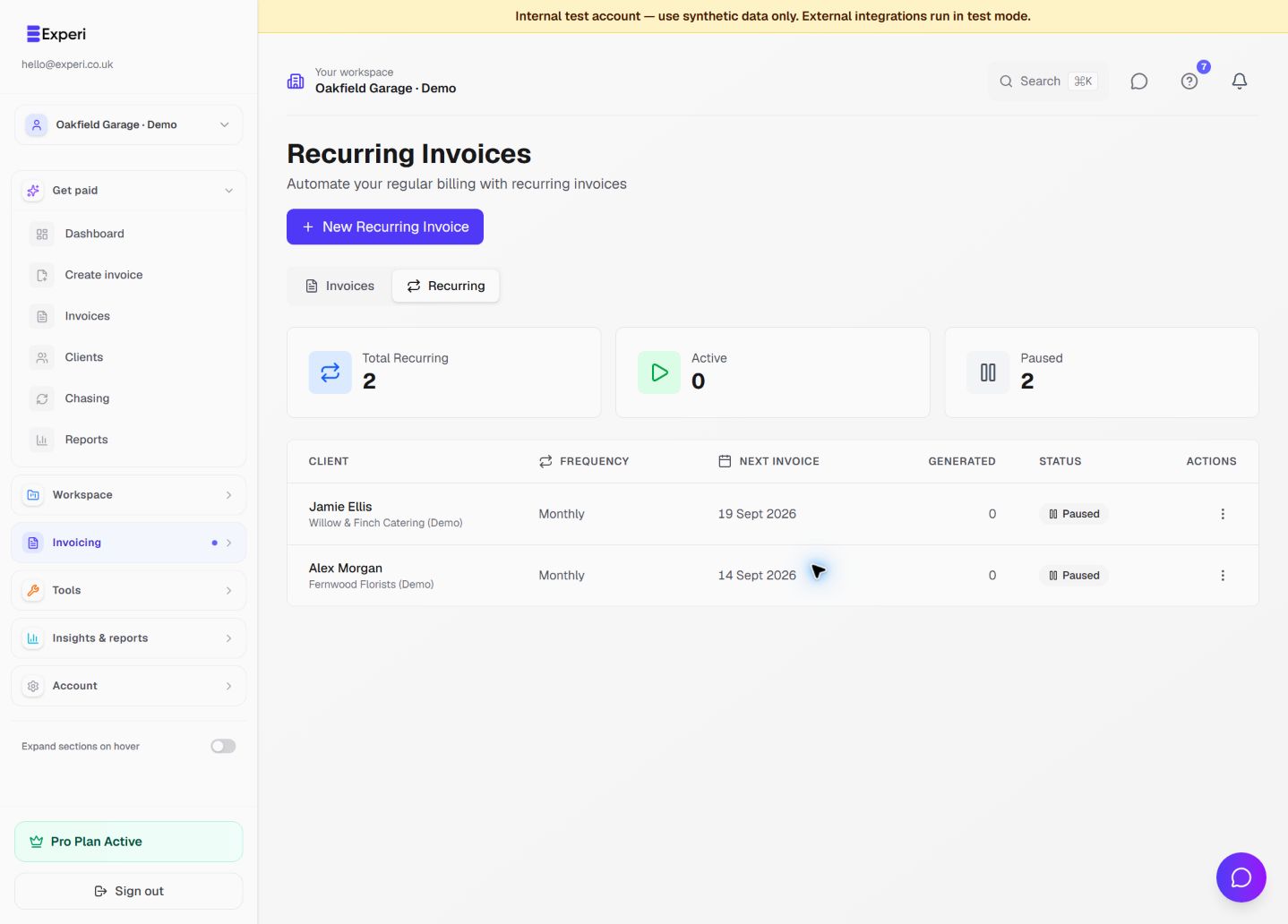
Read the overview screenshot
The recurring list shows the client, frequency, next invoice date, number of invoices generated and Active or Paused status. The next date is the generation date, not a promise that the client will pay on that date.
Use the row's actions to open Edit Template, pause an active series or activate a paused one. Paused means scheduled generation is stopped. Turning automatic sending off does not pause the series: it can still generate draft invoices.
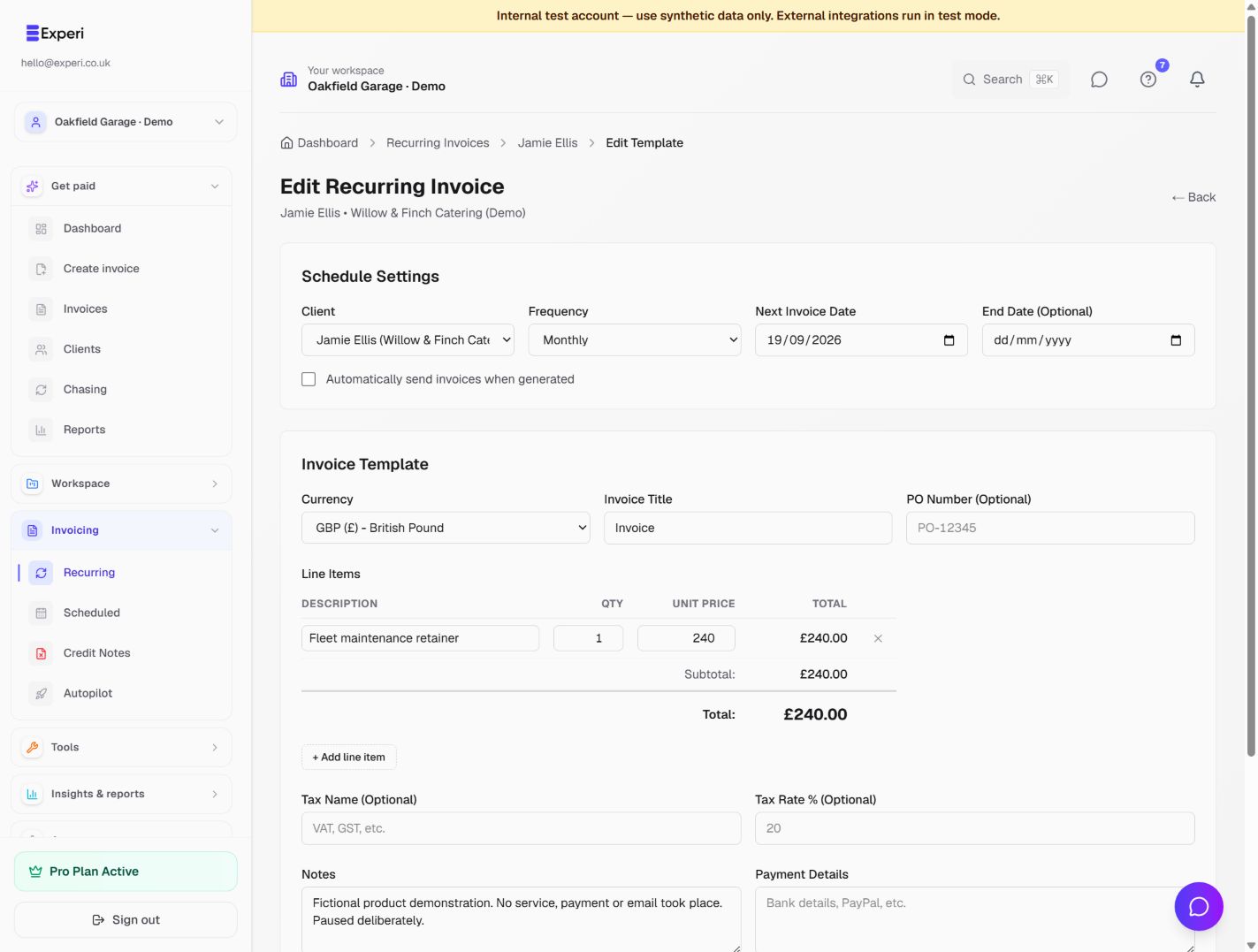
Review the settings screenshot
The edit screen lets you check the client, frequency, next invoice date, optional end date, automatic-send choice and reusable line items. In the example, a monthly fleet-maintenance retainer is £240 and automatic sending is unchecked.
Pause an active series before making changes you do not want the scheduler to use yet. Review quantities, prices, currency, notes and payment details, then save. Before activating again, check the next invoice date and whether that period has already been billed. Past dates can trigger catch-up generation.
Editing a recurring template does not rewrite invoices it has already generated. Open an individual invoice separately if that document needs attention.
What happens on the schedule?
- Active, with automatic sending off: the scheduler creates a draft invoice for you to review and send.
- Active, with automatic sending on: the scheduler creates the invoice and attempts email delivery, subject to the workspace's sending eligibility and recipient details.
- Paused: the scheduler does not generate the next invoice.
Check the generated invoice and its delivery status rather than assuming an email arrived. If something is missing, review the series status, next date, end date, line items, Pro access and sending approval before retrying.
For a single invoice to be delivered later, use Schedule Send instead of creating a repeat series. See recurring, scheduled and provider-managed billing for the differences, and Chasing for follow-up after an invoice is overdue.