

Make the Wedding Package and Extras Clear
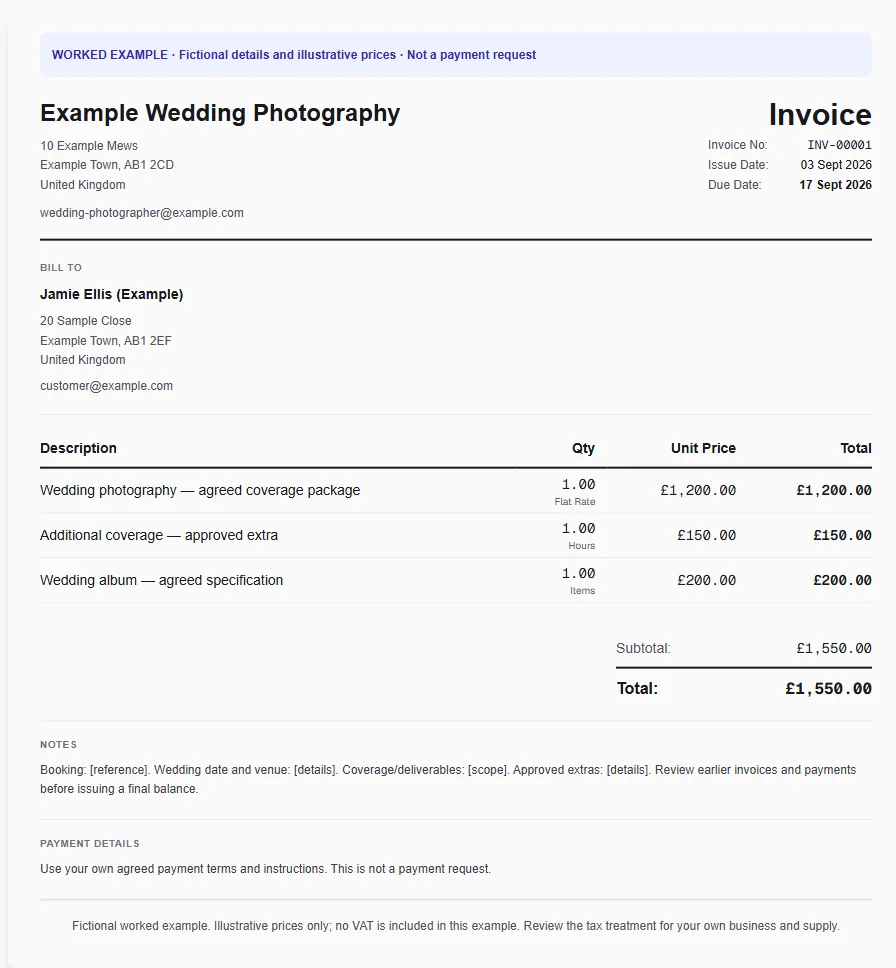
A couple books a wedding coverage package, adds an extra hour and chooses an album. The final invoice needs to match the booking and earlier billing so the couple is not asked to pay a booking deposit twice.
Why Choose Experi?
Start with the booked package
Choose the wedding-photography template and describe the coverage and deliverables in the signed booking. Put the event date and reference in Notes, then enter your own package price rather than using the example.
Separate agreed additions
Add extra coverage, albums and travel only if they sit outside the package. Save your common services and products for reuse, but check the album specification and approved changes for this couple before applying prices.
Review earlier billing
Check deposit invoices and payments before preparing the final amount due. The standard template does not automatically reconcile those amounts; preview the customer copy and use the appropriate supported deposit or final-invoice workflow where needed.
From job to customer invoice
An invoice workflow for wedding photographers
A couple books a wedding coverage package, adds an extra hour and chooses an album. The final invoice needs to match the booking and earlier billing so the couple is not asked to pay a booking deposit twice.
Start with the booked package
Choose the wedding-photography template and describe the coverage and deliverables in the signed booking. Put the event date and reference in Notes, then enter your own package price rather than using the example.
Separate agreed additions
Add extra coverage, albums and travel only if they sit outside the package. Save your common services and products for reuse, but check the album specification and approved changes for this couple before applying prices.
Review earlier billing
Check deposit invoices and payments before preparing the final amount due. The standard template does not automatically reconcile those amounts; preview the customer copy and use the appropriate supported deposit or final-invoice workflow where needed.
Preselected, never automatically applied. Enter your own prices and review the client, dates and tax settings.
Before you invoice: Do not bill a booking deposit twice or imply that applying this template creates a contract, reserves a date or grants image-usage rights. Keep those terms in the agreed booking documents.
The tools behind this workflow
Explore the tools behind this workflow. Templates and inventory are free capabilities; document allowances apply. Time tracking, recurring invoices and automated chasing require Pro.
Perfect For
Key Features
Frequently Asked Questions
Will the template deduct the booking deposit automatically?
No. Review earlier invoices and recorded payments and use the appropriate invoice workflow before issuing the final balance. Applying a template only supplies reusable line items and text; it does not allocate deposits.
Which features are available on Free?
Curated and saved templates, operational inventory and invoice printing are available on Free and Pro. Free has document allowances; check Pricing for current limits. Time tracking, recurring invoicing and automated chasing require Pro.
Get Back to the Work You Love
Spend less time on invoicing and more time doing what you're great at.
No credit card required • Start invoicing in under 60 seconds