Help CenterPricing & PlansCan I cancel my trial or subscription?

Can I cancel my trial or subscription?

Learn how to cancel your trial or PRO subscription, and what happens to your data.

3 min read
beginnerUpdated 5 Mar 2026

Can I Cancel My Trial or Subscription?

Short answer: Yes! You can cancel your PRO trial or subscription anytime, for any reason, with no penalties or fees.

Canceling Your Free Trial

How to Cancel

There's actually nothing to cancel! Your 14-day trial is completely free and ends automatically after 14 days.

You don't need to:

  • Enter a credit card
  • Remember to cancel
  • Contact support
  • Fill out forms

Just enjoy the trial. When it ends, you'll automatically return to the free plan.

What Happens When My Trial Ends?

If you don't upgrade to PRO:

  • ✅ You automatically move to the free plan
  • ✅ All your data stays safe (nothing is deleted)
  • ✅ You can still access all your invoices and clients
  • ✅ You'll have the free plan limits (10 invoices/month, 5 clients)
  • ✅ You can upgrade to PRO anytime later

Will I Be Charged?

No! Trials are completely free and never automatically convert to paid subscriptions. You'll only be charged if you explicitly click "Upgrade to PRO" and add payment details.

Canceling Your PRO Subscription

How to Cancel PRO

If you're on a paid PRO plan and want to cancel:

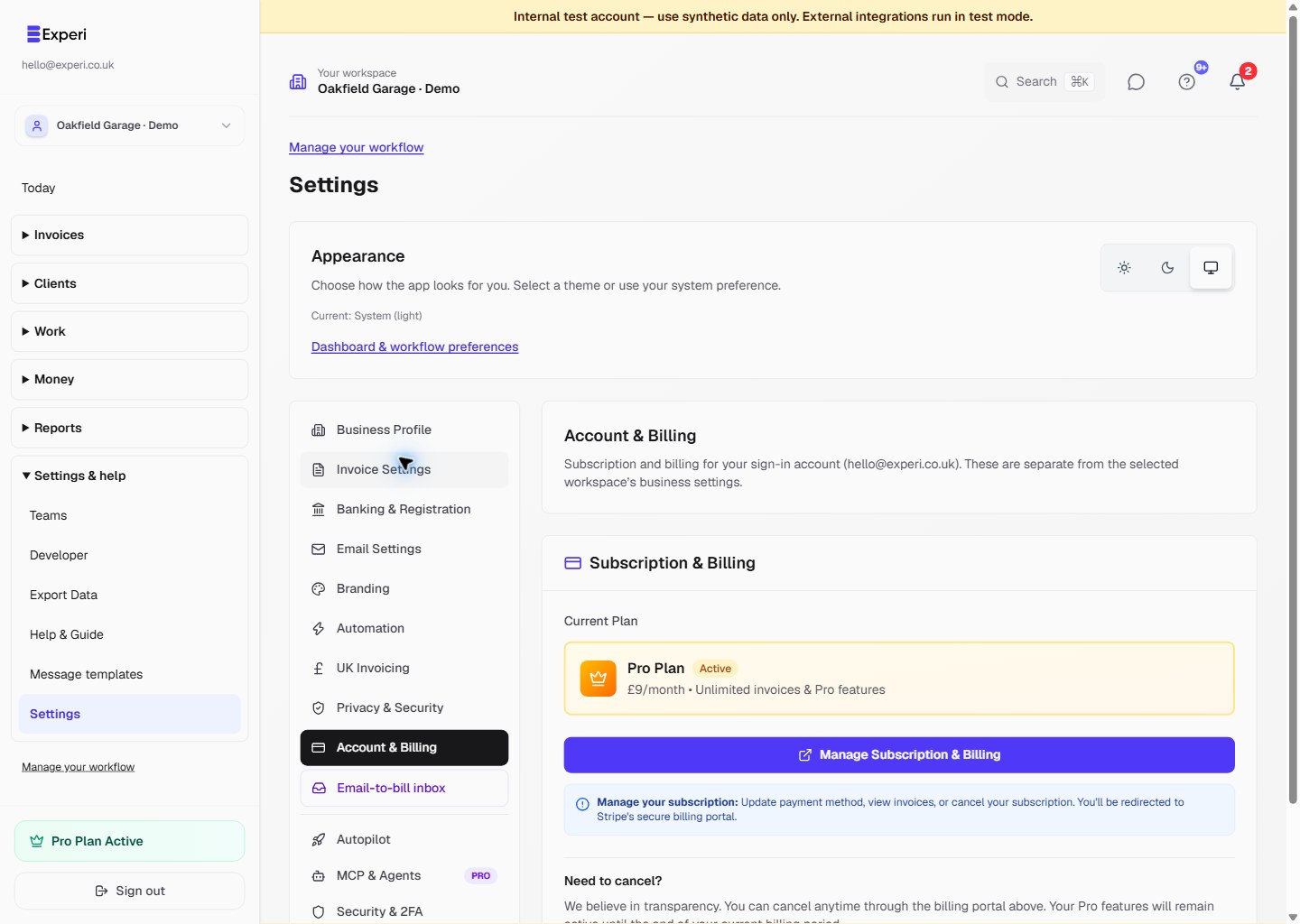
  1. Log into your Experi account
  2. Go to Settings > Subscription
  3. Click "Cancel Subscription" or "Manage Subscription"
  4. Confirm cancellation

That's it. No phone calls. No exit surveys. No hoops to jump through.

What Happens When I Cancel?

When you cancel your PRO subscription:

  1. Immediate: Your cancellation is confirmed
  2. Until end of billing period: You keep full PRO access until your current paid period ends
  3. After billing period: You automatically move to the free plan

Example:

  • You subscribe on January 5th (charged £9)
  • You cancel on January 20th
  • You keep PRO until February 5th
  • On February 5th, you move to the free plan
  • You're not charged again

Will I Get a Refund?

We don't offer refunds on monthly subscriptions, but you'll keep access until the end of your paid period.

Pro tip: Cancel right before your next billing date to maximize your paid time.

What Happens to My Data?

Nothing is deleted. Ever.

When you downgrade from PRO to free:

  • ✅ All invoices remain accessible
  • ✅ All clients stay in your account
  • ✅ All historical data is preserved
  • ✅ All payments continue to be tracked
  • ✅ All your settings are saved

The only thing that changes is your access to PRO features.

What Changes When I Downgrade?

Free Plan Limits

When you return to the free plan:

  • Invoices: 10 per month (starts next calendar month)
  • Clients: 5 clients (existing clients aren't deleted)
  • Quote conversions: 3 per month
  • Credit notes: 3 per month

PRO Features You'll Lose Access To

  • ❌ Automated payment reminders (manual reminders still work)
  • ❌ Time & expense tracking (data is saved, but read-only)
  • ❌ Recurring invoices (existing ones stop)
  • ❌ Projects & unbilled work dashboard
  • ❌ Custom branding (logo will have watermarks)
  • ❌ Service agreements
  • ❌ Advanced multi-currency
  • ❌ Calendar view

What You Keep

  • ✅ 10 invoices per month
  • ✅ 5 clients
  • ✅ Unlimited quotes
  • ✅ Payment tracking
  • ✅ Manual reminders
  • ✅ All your historical data

Can I Reactivate My Subscription?

Yes! You can upgrade back to PRO anytime:

  1. Go to Settings > Subscription
  2. Click "Upgrade to PRO"
  3. Enter your payment details
  4. Instant access to all PRO features

All your previous PRO data (time entries, projects, etc.) will be accessible again immediately.

Common Cancellation Questions

Q: Will you try to convince me to stay?
A: No. Click cancel, confirm, done. No guilt trips or retention offers.

Q: Can I pause my subscription instead?
A: Not yet, but we're considering this feature. For now, you'll need to cancel and re-subscribe when ready.

Q: What if I cancel by accident?
A: Contact support immediately at support@experi.co.uk - if it's within 24 hours, we can usually help.

Q: Do I need to cancel before my next billing date?
A: No, but it maximizes your paid time. You'll keep access until your billing period ends regardless.

Q: Can I export my data before canceling?
A: You don't need to! All your data stays in your account forever, even on the free plan. But yes, you can export invoices as PDFs anytime.

Q: Will my clients be notified if I cancel?
A: No. Your clients won't know or be affected in any way.

Need Help?

If you're thinking about canceling because something's not working right, contact us first! We're here to help.

Email: support@experi.co.uk
Live chat: Available in the bottom right corner

We'd rather fix your issue than lose you as a customer.


Cancel your subscription anytime from Settings > Subscription.

Was this article helpful?

Still need help?

Can't find what you're looking for? Our support team is here to help you succeed.

Contact Support