Help CenterPricing & PlansWhat are the free plan limits?

What are the free plan limits?

Understand the free plan's monthly limits and what happens when you reach them.

4 min read
beginnerUpdated 4 Mar 2026

What Are the Free Plan Limits?

The Experi free plan is designed for micro-businesses and freelancers just getting started. Here's exactly what you get:

Monthly Limits

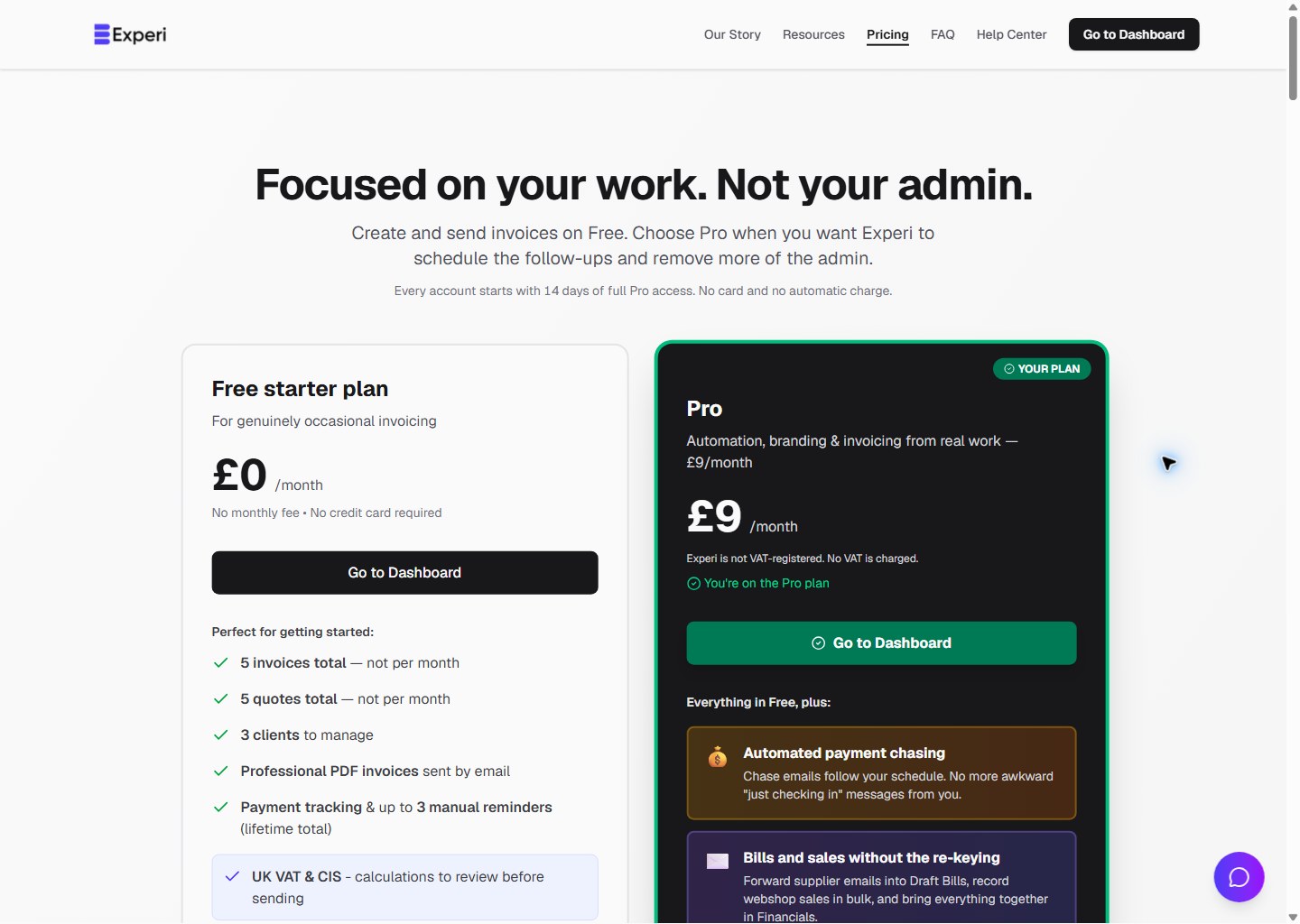
10 Invoices Per Month

  • You can create and send up to 10 invoices each calendar month
  • The counter resets on the 1st of every month
  • Draft invoices don't count towards your limit (only sent/finalized invoices)
  • Credit notes count as separate documents (3 per month included)

5 Clients

  • You can have up to 5 active clients in your account
  • Archived/deleted clients don't count toward this limit
  • If you reach 5 clients, you'll need to upgrade to add more

3 Quote Conversions Per Month

  • You can send unlimited quotes (no limit!)
  • But you can only convert 3 quotes to invoices per month
  • This counter also resets on the 1st of every month

3 Credit Notes Per Month

  • You can issue up to 3 credit notes each month
  • Credit notes are separate from regular invoices
  • Resets monthly on the 1st

What's Unlimited on Free?

Even on the free plan, you get:

Unlimited quotes - Send as many proposals as you want
Unlimited payment tracking - Track all payments, no limits
Unlimited email sending - Send invoices and reminders freely
Unlimited invoice viewing - Access all your past invoices anytime
Unlimited storage - All your data is saved forever

What Happens When I Hit a Limit?

Invoice Limit (10/month)

When you've sent 10 invoices:

  • You'll see a message: "You've reached your monthly invoice limit"
  • You can still view and manage existing invoices
  • You can still send quotes
  • You won't be able to create new invoices until next month
  • Solution: Upgrade to PRO for unlimited invoices

Client Limit (5 clients)

When you have 5 clients:

  • You'll see a message when trying to add a 6th client
  • You can still work with your existing 5 clients
  • Solution: Archive old clients or upgrade to PRO for unlimited clients

Quote Conversion Limit (3/month)

When you've converted 3 quotes:

  • You can still send new quotes
  • But you can't convert them to invoices until next month
  • Solution: Upgrade to PRO for unlimited conversions

When Do Limits Reset?

All monthly limits reset on the 1st of every month at midnight GMT.

For example:

  • If you send 10 invoices by January 15th
  • On February 1st, your counter resets to 0
  • You can send another 10 invoices in February

How Can I See My Current Usage?

Your current usage is displayed:

  1. On your Dashboard (top of the page)
  2. On the Invoices page (in the header)
  3. When you try to create a new invoice/client

You'll see something like:

  • "7/10 invoices this month"
  • "4/5 clients"

The display changes color as you approach your limit:

  • Blue: Plenty of room (0-6 invoices)
  • Orange: Getting close (7-9 invoices)
  • Red: At or near limit (10 invoices)

Should I Upgrade to PRO?

Consider upgrading if:

  • ✅ You consistently hit your 10 invoice/month limit
  • ✅ You need more than 5 clients
  • ✅ You want automated payment reminders (save hours chasing)
  • ✅ You need time tracking for billing accuracy
  • ✅ You want recurring invoices
  • ✅ You need custom branding with your logo

PRO costs £9/month and removes ALL limits:

  • Unlimited invoices
  • Unlimited clients
  • Unlimited quote conversions
  • Plus: time tracking, automated reminders, recurring invoices, custom branding, and more

Can I Stay on Free Forever?

Yes! The free plan is free forever. As long as you stay within the limits, you can use Experi indefinitely at no cost.

There's no time limit. No forced upgrades. No tricks.


Need more capacity? Try PRO free for 14 days - no credit card required. Click "Start Free Trial" on your dashboard.

Was this article helpful?

Still need help?

Can't find what you're looking for? Our support team is here to help you succeed.

Contact Support