

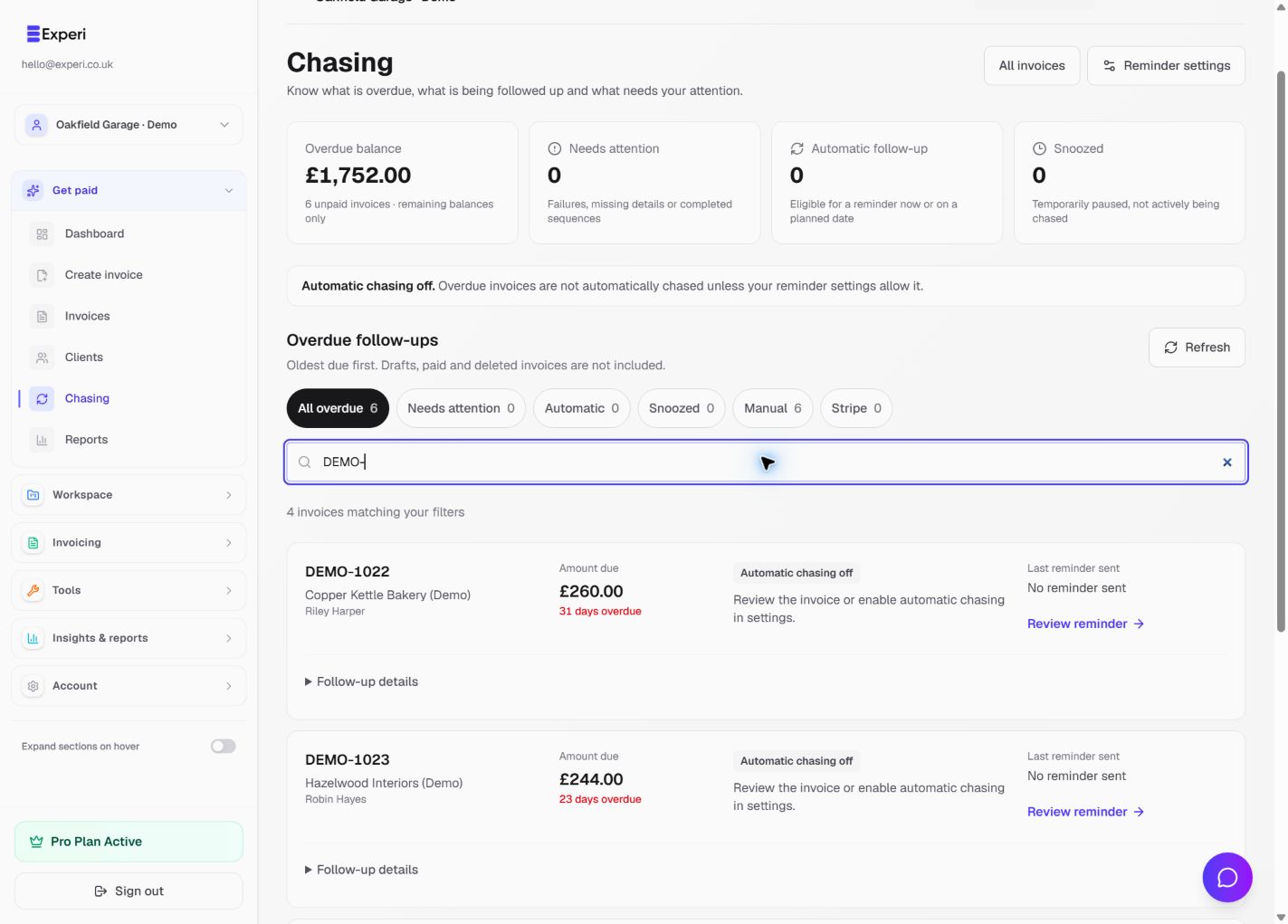
Open Chasing for overdue follow-ups, rather than using the general invoice list as a to-do list. It shows remaining overdue balances, the current follow-up state and relevant next actions.
Review before sending
- Check the selected workspace and open Chasing.
- Search by invoice or client, then use All overdue, Needs attention, Automatic, Snoozed, Manual or Stripe to narrow the list.
- Open the invoice's follow-up details and check the amount still due, last reminder, schedule and any delivery problem.
- Confirm that the client has not already paid or disputed the amount.
- Review the next reminder before sending it or changing the schedule.
Opening this page does not send reminders. Automatic chasing off means the workspace is not automatically chasing these invoices. Pro access alone does not turn the feature on, and email approval remains required.
Handle exceptions
Use Needs attention to investigate failed or incomplete follow-up. A snoozed invoice is paused, not forgotten: review its return date. If a client has paid outside Experi, record the payment correctly before chasing again.
Stripe-managed invoices follow their provider workflow; avoid running overlapping reminders without checking what the customer will receive.
Escalate chasing with a reviewed letter
On Pro, choose Escalate chasing in Chasing or on the overdue invoice. New letters require a positive unpaid balance on a sent, overdue invoice. Confirm the selected workspace, any payments, credits and disputes first.
- Choose Payment reminder, Final reminder or Letter Before Action. Confirm the debtor's legal identity and applicable jurisdiction.
- Choose Prepare editable draft. Review sender and recipient postal addresses, reply details, letter date, subject and the complete letter. Changes to the letter do not change the client or business profile.
- Choose Save draft changes. Then confirm your review and choose Approve fixed copy. The server rechecks the invoice balance; a changed balance requires a new letter. Approval must use today's letter date.
- Use Download PDF or Print letter. An approved copy is fixed; prepare a new draft if it needs changing. These actions do not email, post, mark the invoice paid or file a claim.
- Arrange sending yourself, including any required enclosures. In Sending & delivery, select the approved letter and record the date, method, tracking reference and notes. Confirm it has already been sent, then choose Record as sent.
- Upload proof of posting, replies, agreements and enclosures under Documents & correspondence. PDF, JPEG, PNG and WebP are supported: 3 MB per file, 20 files / 20 MB per invoice. Files stay private to authorised workspace users and are downloaded as originals.
- Record delivery updates manually, with a date and reason. Experi does not query postal tracking or verify that a customer received the letter.
Existing automatic-reminder settings are unchanged. Review or pause them separately if needed so follow-ups do not overlap.
Legal review and interest
Letters start with the outstanding principal only. Optional statutory estimates require a confirmed eligible GBP business debt without part-payments or linked issued credit notes. Check contractual remedies before adding charges. Issued credit notes block new demands in this workflow; review and reconcile their effect separately rather than treating the displayed balance as an agreed debt.
The Letter Before Action starting template is for England and Wales. Check which pre-action process applies. When a business claims from an individual or sole trader, the Debt Claims Protocol can require account information, an Information Sheet, Reply Form and Financial Statement form. Experi does not automatically supply those enclosures. Use the official Protocol and forms.
Review response periods, requests for documents, advice and any dispute. Do not start a claim automatically after 30 days. Seek appropriate advice for construction, rent, disputed debts or other jurisdictions.
Keep and review the history
Approved letters and records remain accessible after payment. Owners, admins and members with invoice permissions can manage recovery on Pro; viewers and accountants remain read-only.
The evidence summary is a text export of invoice details, recorded messages, recovery actions and a supporting-file index. Download approved PDFs and original uploads separately. The export is not a complete court bundle, does not embed those files and does not guarantee legal compliance.
You can add a recovery note or record resolution / a court claim filed outside Experi with a reason. These records do not take court action, change the invoice balance, change stock or mark the invoice paid.
See the Chasing controls guide and recurring and scheduled billing.